In this article
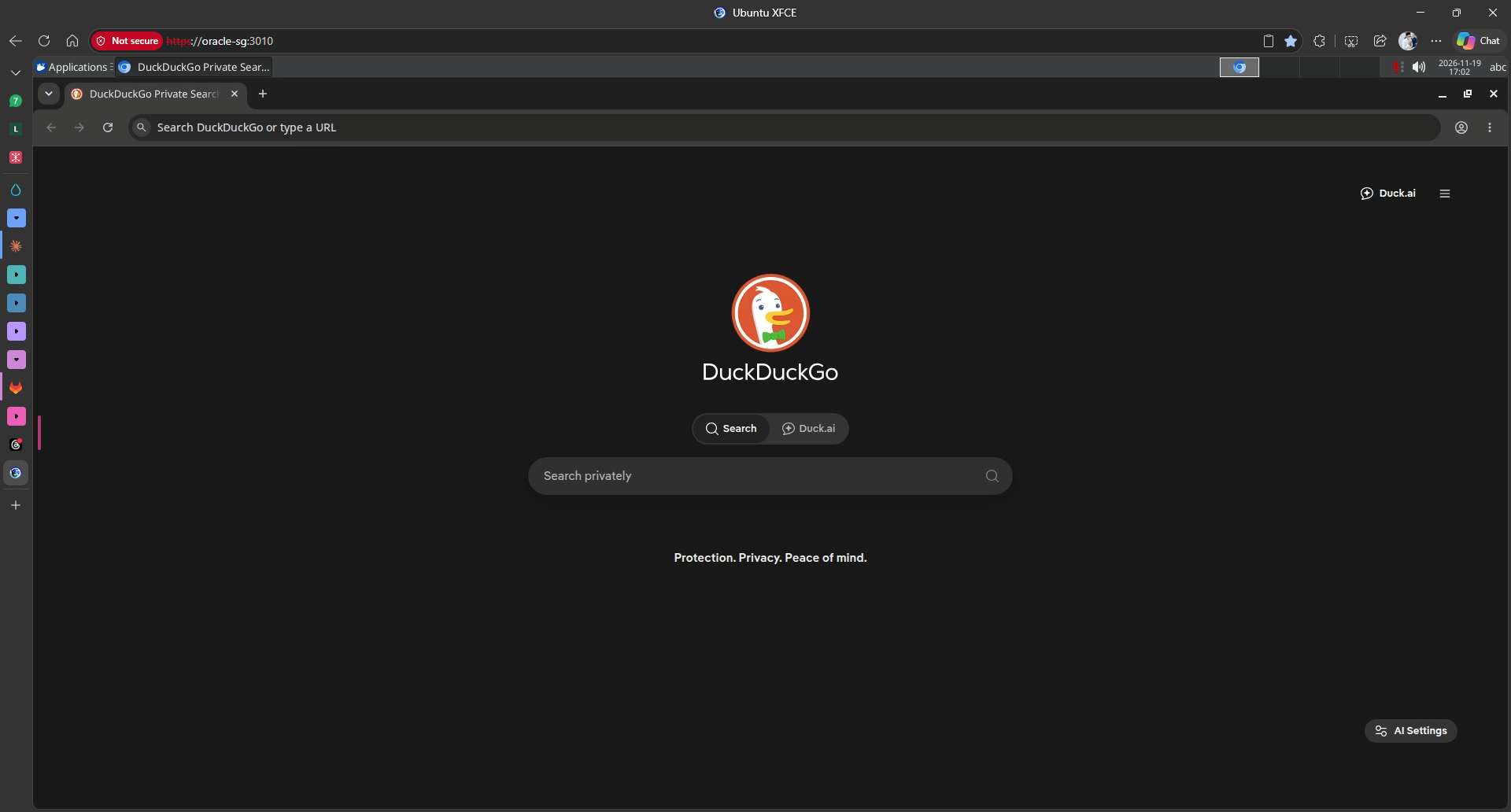
This week I stumbled upon two SaaS, or PaaS, or whatever the correct term is.
The first is boxcompute, a local product made by @farhanhelmycode. It's a bit pricey at USD 15 a month, but if you consider what comes with it, the value gets better.
The second is Simular Box (that's my referral link), and this one came from god knows where. USD 19 a month gets you one virtual box and 5,000 credits a month. I'm only on the free tier, which comes with 5,000 credits, and if you join through the referral link we both get another 5,000. That's 10k credits for a first-time user.
Honestly, I like both approaches. But boxcompute gets a biased mark from me because it's a local product, and the UI, man, the UI is so smooth. You need to try it.
I'm getting sidetracked. Back to the main topic: both services do what I wanted to do, which is give my AI agents (Hermes, DeepSeek and Claude) their own browser.
A browser? Why?
Giving them a browser sounds strange because, well, we can already use a service like Firecrawl (referral link) to scrape the internet for us.
But what if you want to test the UI and UX? Sure, we've got skills like ui-ux-pro-max, but that's not the same as testing the real UX.
boxcompute's answer is a virtual desktop for your AI.
While I was using it, I kept thinking: how did he do it? How did he give the AI a browser to control? So I went down the rabbit hole and found a way. Well, not his exact method.
Chapter 1: "Can we build Simular / Box ourselves?"
I've got a few servers myself: a few hosted locally on Proxmox and one Oracle server on PAYG.
The question I asked myself: can I do what boxcompute does, but on my Oracle server? It's Ubuntu Server with no screen. I had two choices. Try to make it work on Oracle, or take the easy route and spin up a new Ubuntu Desktop VM on Proxmox.
But where's the fun in that, right? So I went searching while doing my daily work, and found it: webtop by LinuxServer.io, an XFCE desktop in a browser.
So what was I waiting for? I SSHed into Oracle and made the docker-compose:
# ~/ai-desktop/docker-compose.yml (final version)
services:
  webtop:
    image: linuxserver/webtop:ubuntu-xfce
    container_name: ai-desktop
    hostname: ai-desktop
    environment:
      - PUID=1000
      - PGID=1000
      - TZ=Asia/Kuala_Lumpur
      - CUSTOM_USER=${CUSTOM_USER}
      - PASSWORD=${PASSWORD}
    volumes:
      - ai-desktop-config:/config
      - ./ai-browser.sh:/config/ai-browser.sh:ro
      - ./ai-browser.desktop:/config/.config/autostart/ai-browser.desktop:ro
    ports:
      - "100.x.y.z:3010:3001"   # desktop (HTTPS KasmVNC), Tailscale only
      - "127.0.0.1:18931:8931"  # MCP backend (agents reach it through a gateway on :8931)
    shm_size: "2gb"
    restart: unless-stopped
And I ran it. It uses about 450 MB of RAM idle, and about 1.4 GB with Chromium busy. I could have stopped there, but I had to remember why I was doing this: to give my agents their own machine!
So I needed an MCP.
Instead of building it myself, I asked Claude to set it up and connect itself to the MCP server. Which MCP did it pick? Playwright MCP.
After that it was just a matter of adding the MCP to Claude Code:
claude mcp add --transport http --scope user ai-desktop http://100.x.y.z:8931/mcp
Now everything connects through my trusted VPN, Tailscale.
The first real test: I asked Claude to open my business site (lakarteduh.com) in the AI desktop and give me a UX review at desktop and phone sizes. It drove the browser on Oracle while I watched it happen live. That was the "ok, this is actually useful" moment.
After Claude was done, I connected Hermes and the DeepSeek harness to the same MCP. And, to no one's surprise, it worked! Now all three of my favourite agents are connected to the MCP and have their own browser.
Of course it wasn't as smooth as it sounds. I hit a few problems here and there, especially with the DeepSeek harness. But hey, that's what Claude is there for.
Chapter 2: "Can we do Android too?"
While my agents were doing UX tests on the project, I started thinking. I've got an Android project going on. Can I run a virtual Android, or whatever it's called, on the server too?
So I went looking and found Redroid, Android in a container! I wasted no time and set up the docker-compose.yml.
The idea was to use Android 16, lol, but it got stuck in a crash loop. So I switched to Android 15, and it works nicely.
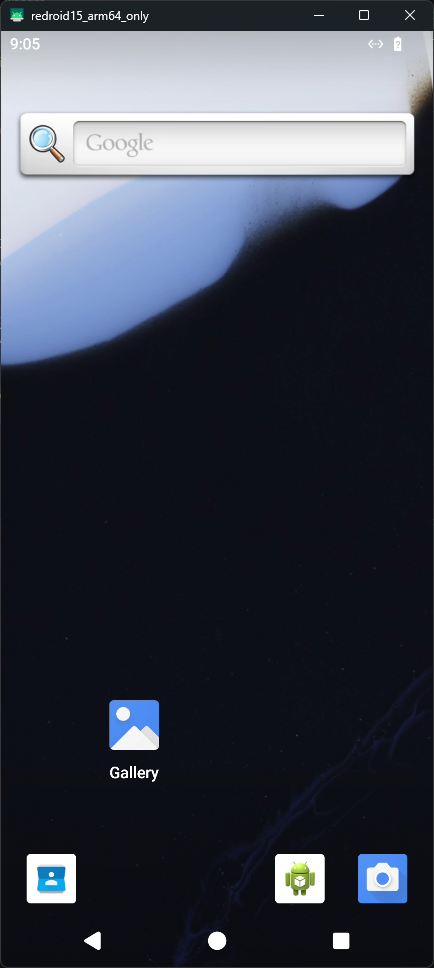
And I think you know where this is going. MCP!
You might be asking why I need an Android emulator. Dude, haven't you been reading? I've got an Android app project going right now, and as someone who lacks UX knowledge, I wish AI could do it for me. Thus ai-phone was born.
Chapter 3: "What else can we add?"
Now we had ai-desktop and ai-phone. What else could we do?
I asked Claude that exact question, and it suggested these:
| Machine | What | Image |
|---|---|---|
| ai-shell | Ubuntu box agents can do anything in, with internet but no access to my servers | custom (Ubuntu 24.04, Node 22, Python, git, build tools) |
| ai-mail | Fake inbox that catches every email my apps send | axllent/mailpit:v1.33.0 |
| ai-iot | MQTT broker for fake (later real) sensors | eclipse-mosquitto:2.0.22 |
By then it was almost 10am and my working hours were starting, so I put Claude on auto mode: go, my friend, go build it for me!
You must be wondering: as an IoT guy, surely I'd install Node-RED, right? Nah. I already have n8n running on my server. It does almost the same thing as Node-RED, but with AI. Hahahaha.
The isolation (the most important part)
Why the most important part? Because I already had one rule before all of this: DeepSeek and Hermes never get access to my Oracle server. That server runs my real stuff, my portfolio site, n8n, my CRM, and it holds real client data. I trust my agents, but not that much lol.
So ai-shell is the place where they can go wild. It's an Ubuntu box, sudo works, they can install whatever they want. But sudo only works inside the container, and it's capped at 2 CPUs, 4 GB of RAM and 2048 processes. Go crazy, buddy, just not on my real server.
The lab containers sit on their own Docker network, and iptables rules let them reach the internet and each other, nothing else. They can't reach the Oracle host, my other Docker stacks, my Tailscale devices, private LANs or the cloud metadata endpoint.
docker network create --subnet 172.31.250.0/24 -o com.docker.network.bridge.name=br-ai-lab ai-lab
And of course I tested it. From inside ai-shell the internet works, but n8n, host SSH, the desktop MCP and my own PC are all blocked. Nice.
Well, the first version was too good at its job. It blocked the replies too, so opening ai-shell over HTTPS gave me a 502 Bad Gateway. The fix was to block only new connections coming out of the lab, so replies can still go back.
Claude also wrote a small MCP for the lab (Python, FastMCP) with 10 tools. Now an agent can run a signup flow on my app, then open ai-mail and read the confirmation email, all through one MCP. That's the kind of testing I'm too lazy to do myself. Hehe.
Chapter 4: the dashboard happens (by accident)
This is where the accident happened. I had all these tools for my AI, but nowhere to control them or watch them.
The idea was simple: these machines are disposable, so I wanted a Reset button for each one. That became ai-dash, a tiny Python web server (standard library only) with:
- a status light for each machine
- copyable addresses and "Watch live" links
- a Reset button that runs a fixed script, e.g. the phone:
#!/bin/sh
# ~/ai-dash/resets/ai-phone.sh
set -e
cd /home/ubuntu/ai-phone
docker compose down -v          # -v = delete the phone's data volume
docker compose up -d
i=0
until [ "$(docker exec ai-phone getprop sys.boot_completed | tr -d '\r')" = "1" ]; do
  i=$((i+1)); [ $i -gt 60 ] && { echo "Android did not boot in 5 minutes"; exit 1; }
  sleep 5
done
APK=$(ls -1 apks/Expo-Go-*.apk | sort -V | tail -1)
docker cp "$APK" ai-phone:/data/local/tmp/expo.apk
docker exec ai-phone pm install -r /data/local/tmp/expo.apk
I even asked Claude, "do we even need a dashboard? I already have Beszel." Fair question right? But Beszel is for monitoring, and this thing is for operating the lab. Different jobs. So we kept it.
But honestly, it was still just a page of reset buttons. Then I asked one more question: "Can we see which agent is connected?"
That question is where it really became a dashboard.
MCP has no built-in "who's connected" view. So Claude put a small gateway in front of all three MCP servers. The best part, my agents didn't need any change at all. The gateway took over the same ports, and the real MCP servers moved behind it.
Now the gateway records:
- who: every MCP client sends its name when it connects, so I can see
claude-code,hermes-agentanddsh-mcp-connector - from where: the device name, straight from Tailscale
- what: the tool names only, never the arguments or the results. I want to know what they're doing, not read their homework
Funny thing, the DeepSeek harness reconnects about every 5 minutes, so it flooded the activity feed. Bro, chill. Claude fixed it by folding the repeated connects into one line.
Then came the polish rounds. Sidebar, KPI tiles, dark and light theme, the usual. There was a bar chart of calls per 5 minutes, and I asked, "does the bar chart make sense here?" It didn't, so it became an agent timeline: one lane per agent, one mark per tool call, coloured by machine.
Then Claude listed seven more ideas. I said "I like 5, 6, 7… maybe we do all 1-7?" Because why not right? The ones I like the most:
- live thumbnails of the desktop and phone screens, refreshed every 10 seconds, but only while I have the dashboard open
- failed tool calls show up in red
- a block / kill switch, for one agent on one machine or for everyone at once
- phone snapshots, so I can save the phone with my app installed and logged in, then restore it later (about 113 MB each)
- Telegram alerts through my own n8n, when a machine goes down, a reset fails or an agent keeps failing
The kill switch is my favourite. When an agent is blocked, its next tool call comes back with this:
Blocked: the owner paused this agent on ai-lab from the AI Lab dashboard. Stop and ask the user.
The owner. That's me. Hahahaha.
And so the AI Lab was born!
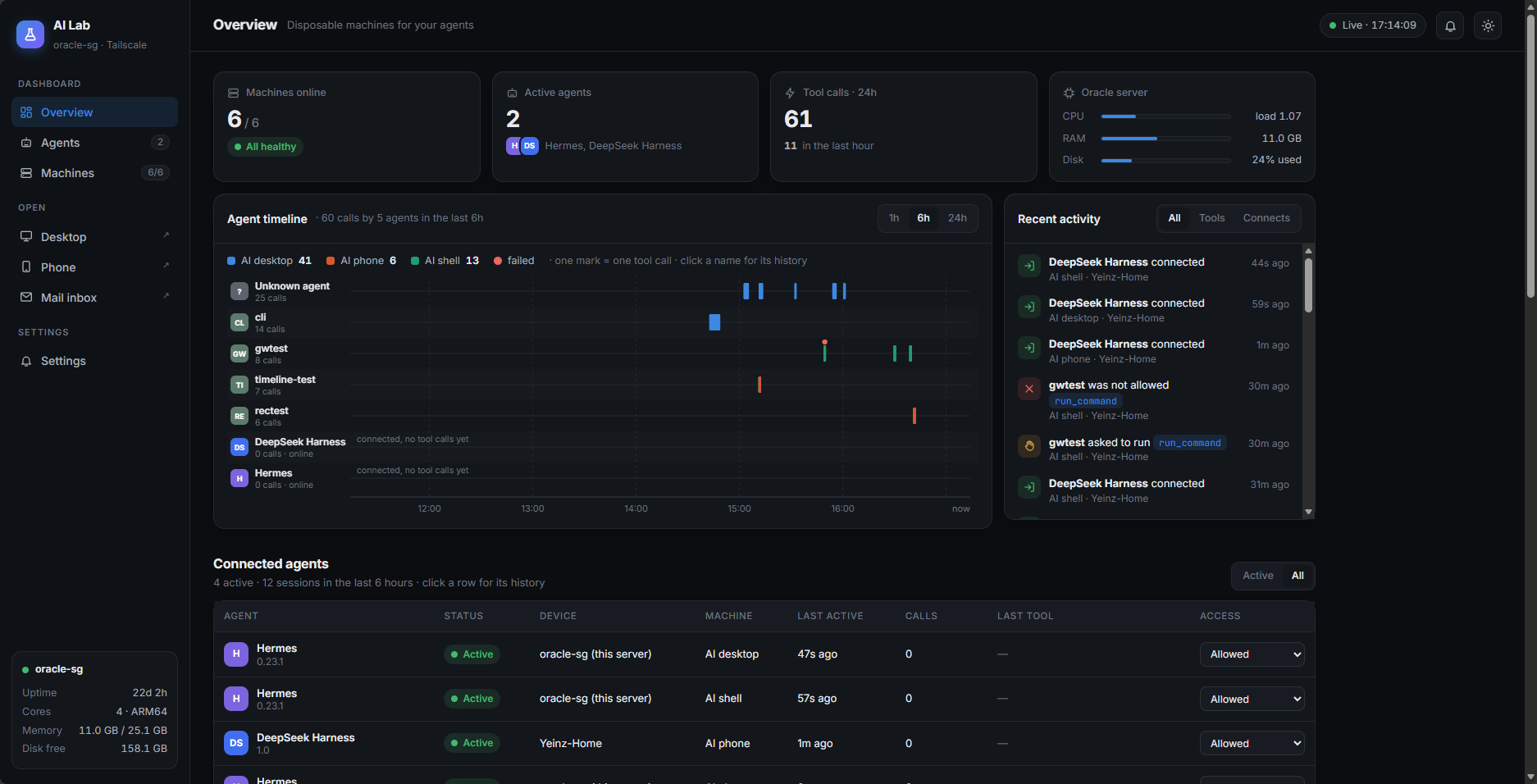
Obviously not by my hand, but by Claude's.
The best part is this:
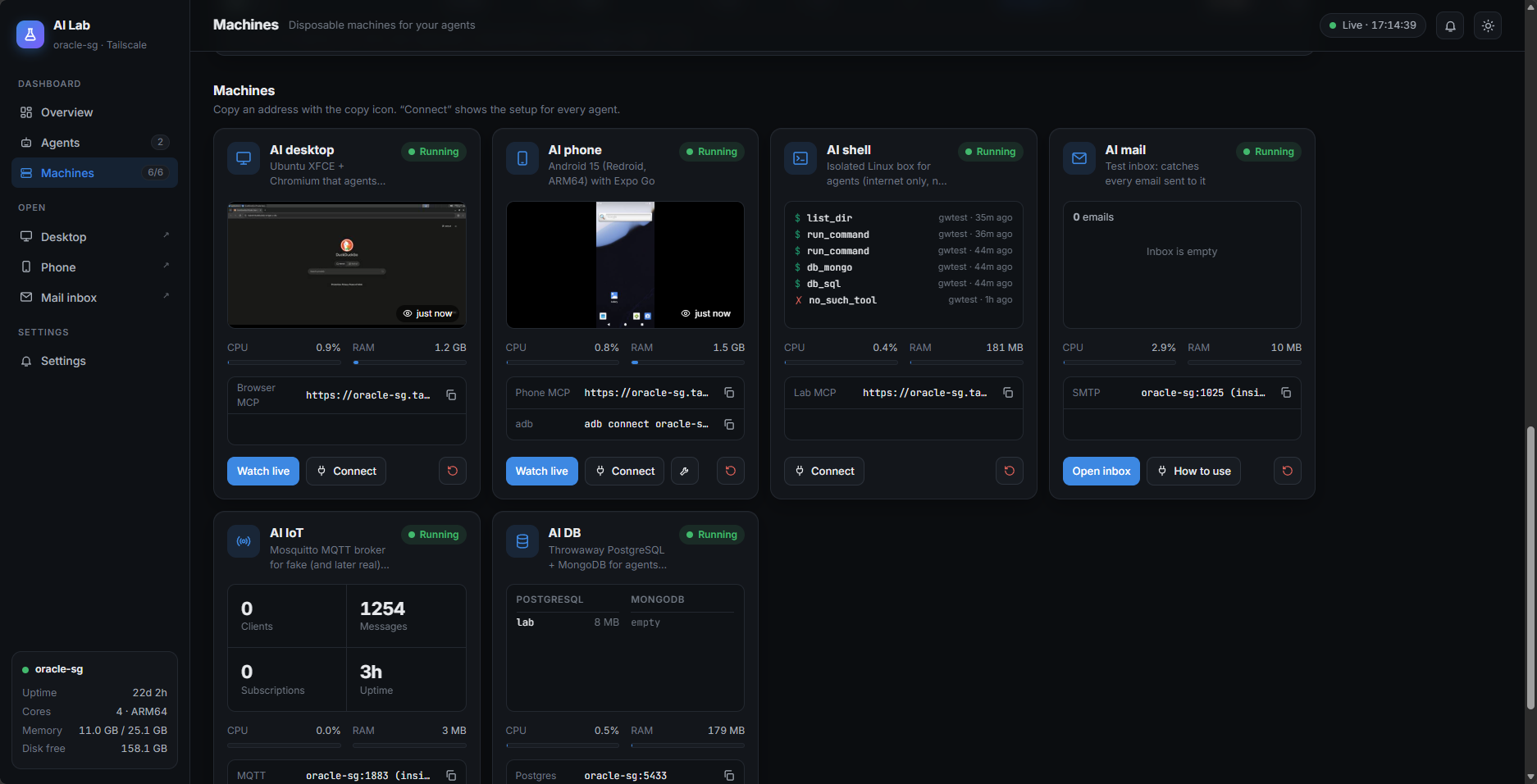
I can watch live what they're doing. Hehehehe.
Last bug of the day: the Reset button on the phone card was sticking out of the card, because the phone got one button too many. After a whole day of Android crash loops and iptables rules, guess which bug I noticed first 😂
So, was it worth it?
Remember the prices at the start? boxcompute is USD 15 a month and Simular is USD 19 a month.
Mine took about 5 hours, from around 10:45 to 4pm, while I was doing my day job. Cost? RM0. Oracle free tier, open-source images and my own n8n. That's 11 containers, and all three of my agents, Claude Code, Hermes and the DeepSeek harness, can use it. Everything is behind Tailscale, nothing is public.
But to be fair to them, if you don't have a server, or you just want that smooth UI, pay for boxcompute or Simular. That's the easy route, and they did the hard part for you.
Me? I just wanted to give my AI a browser. Now it has a desktop, a phone, a sandbox, an inbox, an IoT broker and a dashboard where I can watch it work. Accidentally. Hehe.
p/s: Remember lakarteduh.com, the site Claude did its first UX test on? That's my business, Lakar Teduh. I build IoT stuff, like sensors that message your phone when something breaks and the dashboards that go with them, plus websites and apps for Malaysian businesses. Landing pages start from RM1,500. So if you want something like this AI Lab dashboard but for your own machines, or just a website that looks right on phones, WhatsApp me or drop an email. The first chat is free. Hehe.