In this article
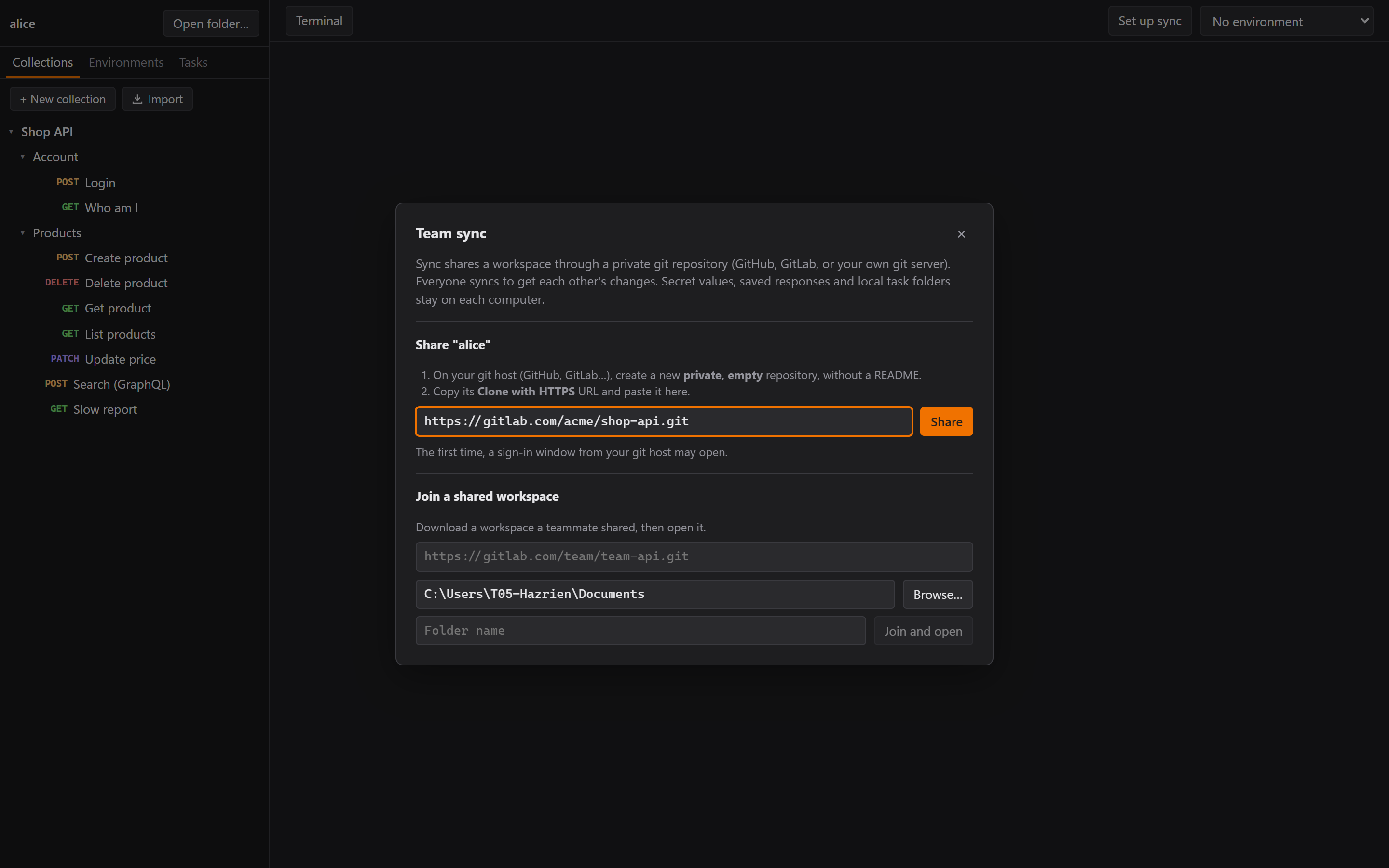
In Part 2 Rustman got a terminal and run tasks. This part is about the feature that started this whole thing, the one behind Postman's paywall: sharing a workspace with your team.
Three ways to do it
My first instinct was a sync server: "I've got a DigitalOcean droplet, 1 GB RAM. Is it enough? Only 2 or 3 people at my company will use it."
Claude laid out three options:
- A. A Sync button on top of git, using the GitLab we already have. Nothing to host.
- B. The same, with a self-hosted git server (Gitea) on the droplet.
- C. A custom real-time sync server.
The droplet could run any of them. But C is by far the most work: accounts, TLS, conflicts, backups. I picked A.
Then I asked: "If I put this on my website and maybe open source it, how does team collaboration work for other people?" That's where A really wins. Every team brings its own git repo: GitHub, GitLab, a server in their office. I host nothing, pay nothing, and never see anyone's API data. Remember my empty wallet from Part 1? It approves.
Remember the other rule from Part 1, everything is a plain file? This is the payoff. (The
step-by-step hosting guide from this part is in the repo, under docs/guides/self-host-sync.md.)
What Sync does
- Set up sync → Share: paste an empty private repo's URL. Rustman runs
git init, makes sure secrets, saved responses and local task folders are gitignored, commits and pushes. - Join: clone a shared workspace and open it.
- ⟳ Sync in the top bar: save, commit Rustman's folders, fetch, merge, push, and report what came in: "✓ Got 1 change from Bob: stock-report."
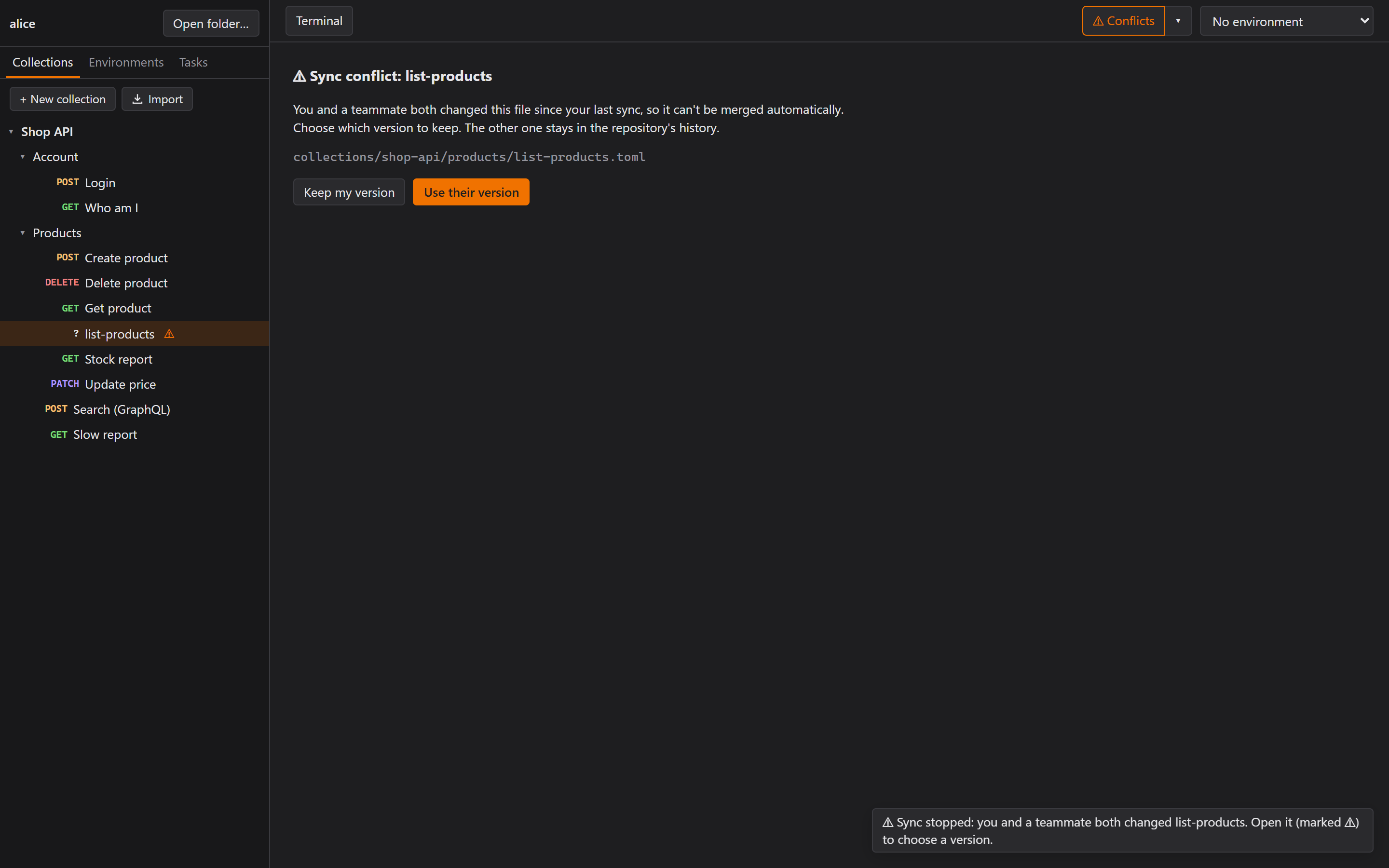
- Conflicts: if two people changed the same request, it gets a ⚠ in the sidebar, and you pick Keep my version or Use their version.
- It uses the git that's already installed (no bundled library, so the app stays small), and sign-in is left to git's own credential manager.
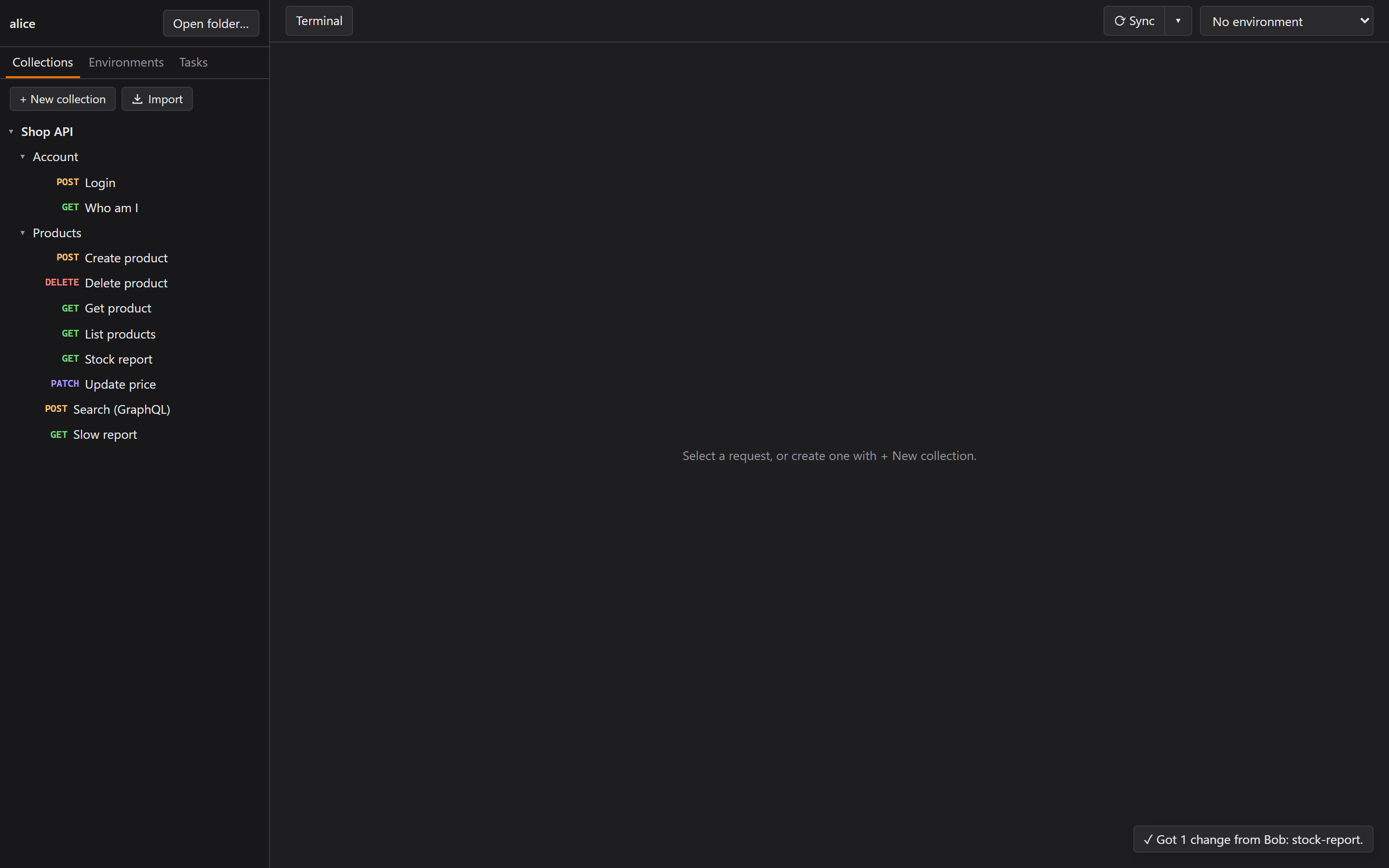 "Got 1 change from Bob." Bob was a script using plain git from the command line. Sorry, Bob.
Guard rails, because of Part 2
Sync was built on the same day I pushed a password to GitLab, so it's paranoid on purpose:
- Sync only ever commits
collections/,environments/,tasks/and.gitignore. A test checks that a straynotes.txtstays local. - Sync only runs in repos marked as Rustman workspaces. This one mattered more than I expected, because the workspace I was testing in was the Rustman source repo itself. Without the mark, Sync would have happily committed and pushed the app's own source code. A test covers exactly that.
The first end-to-end test (a bare repo standing in for GitLab, and "Bob" using git from the command line) also found a real flaw. During "Use their version", the button didn't show it was busy until the second step, so you could click it twice. The whole resolve, finish and push now counts as one busy operation.
"Wait, what is Gitea?"
I wanted a guide for teams that don't want GitHub or GitLab: hosting the shared repo "locally, with Docker, with WSL, and on a server". Along the way I asked, "Wait, what is Gitea?" and then, "Can we not use Gitea?"
Yes, I didn't know Gitea before this. That's one of the things I like about building with other people (in my case, Claude): you learn something new. Gitea ended up working very well for team sync. Oh, and sync also works with GitHub and GitLab, so you don't need Gitea at all. But the key point is, I learned about Gitea!
The answer to "can we not use it" shaped the guide. git itself doesn't need a server program, so the guide goes from least to most to maintain:
- GitHub or GitLab. Nothing to host.
- A shared folder on the office network:
\\pc\share\repo.git. No server at all. - Plain git over SSH on a server: a
gituser, a bare repo, your teammates' keys. - Gitea, a small self-hosted GitHub, as a Windows program, in Docker, in WSL, or on a server.
Then I tested it at home, with two computers.
Test 1: Gitea in WSL, home PC and laptop
Sign-in that never appeared
The very first Share failed:
fatal: Cannot prompt because user interactivity has been disabled.
fatal: could not read Username for 'http://localhost:3000': terminal prompts disabled
The first guess was the plain http:// address. Wrong: Git Credential Manager only warns about
that.
The real cause: Rustman runs git with GIT_TERMINAL_PROMPT=0, so git never waits on a terminal
nobody can see. But GCM reads that same variable as "no prompts at all", its own sign-in window
included. The comment in our code said "sign-in goes through the credential manager's window". It
was exactly backwards.
Claude proved it before fixing it: git credential fill with only GIT_TERMINAL_PROMPT=0 gave the
same error, and adding GCM_INTERACTIVE=always made the window open. Rustman now sets both.
And this wasn't a WSL problem. It would have hit anyone on GitHub or GitLab who wasn't already signed in. It had only worked at the office because git there already had saved credentials. Lucky me.
The laptop couldn't reach Gitea
WSL forwards ports to the PC's own localhost, not to the network. So we added a Windows port
forward from the PC's address to 127.0.0.1:3000, plus a firewall rule.
Still nothing, even from the PC itself. netstat showed why: WSL was listening on [::1]:3000
only, IPv6. The browser on the PC had worked because browsers try both. The fix was to forward IPv4
to IPv6:
netsh interface portproxy add v4tov6 listenport=3000 listenaddress=<pc-ip> connectport=3000 connectaddress=::1
The laptop opened Gitea right away, and the guide now has that step.
"It work nice. Very nice."
The laptop only needed Git and the 3.2 MB installer. Join worked, the collection appeared, and changes went both ways. That heading is my actual message to Claude, typos and all.
Then I asked for what Postman does: sync the moment I click Save, and a timer I can set as low as 30 seconds.
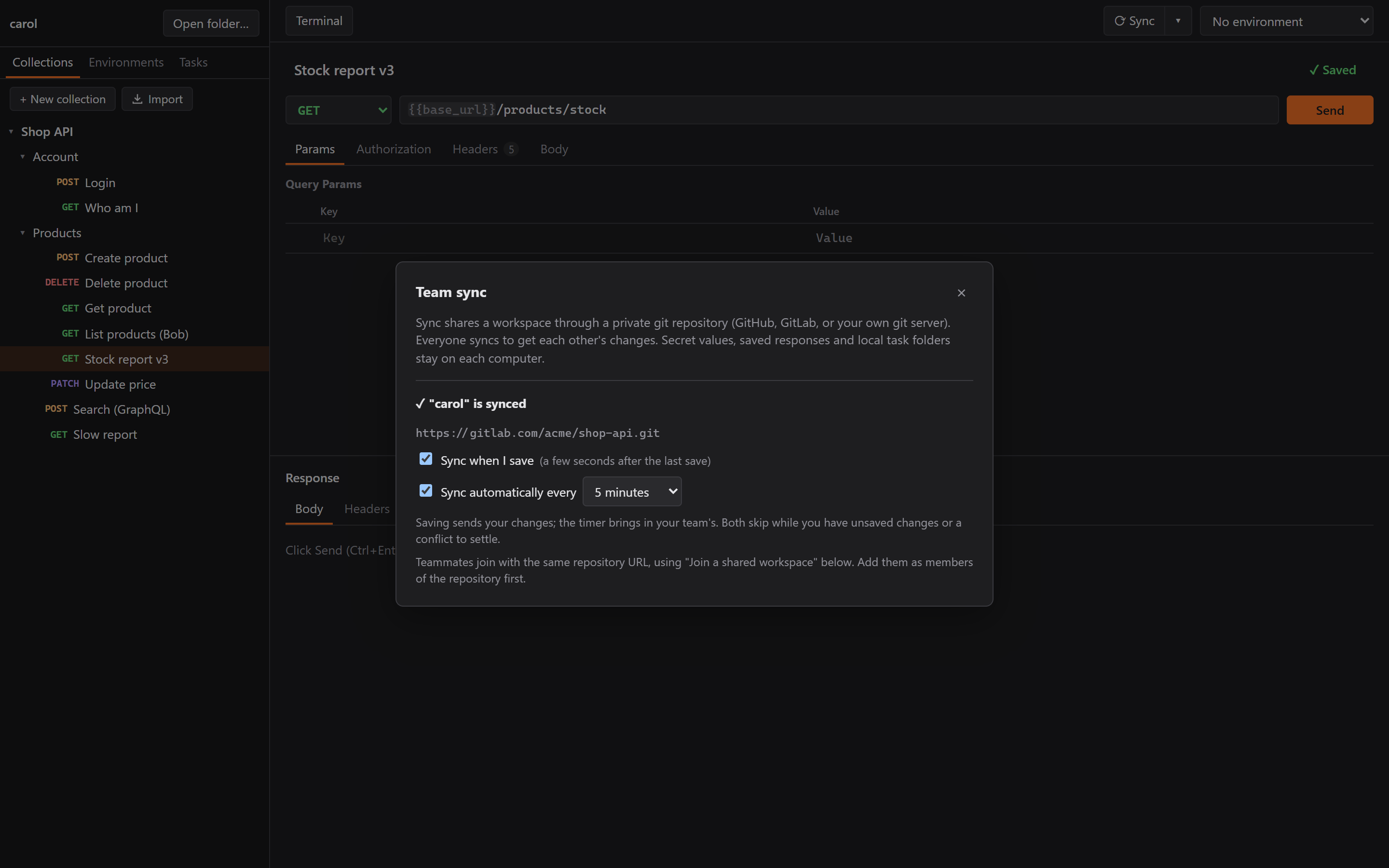
- Sync on save, 3 seconds after the last save, so a burst of Ctrl+S makes one sync.
- A timer from 30 seconds to 1 hour (default 5 minutes). Saving sends, and the timer is how you receive. Postman's servers push changes to you. Without a server, Rustman can only check.
- Quiet. A successful automatic sync says nothing unless teammates' changes came in. A failed one doesn't pop up an error on every Ctrl+S. The button just turns to "⚠ Sync · not sent".
Test 2: a real server, git.hazrien.com
Next, the guide's "on a server" section, on the droplet that runs this website. Claude did a read-only look first: 1 GB RAM with about 640 MB free, and the website already behind Caddy in Docker on ports 80 and 443. Enough room for Gitea (about 120 MB), but the guide's fresh-server steps would start a second Caddy that clashes with the first.
So Gitea went into its own folder on the website's Docker network, with one git.hazrien.com block
added to the existing Caddyfile. A few decisions worth stealing:
- No public first-run page. Gitea's install page makes whoever reaches it first the admin. It started locked, with registration off, and the admin was created from the command line.
- A 256 MB memory cap, so Gitea can never starve the website.
cat new > Caddyfile, nevermv. Docker mounts the Caddyfile by its file identity, so after amv, Caddy keeps reading the old one.- Claude Code's safety checks stopped three steps: creating the admin (Claude would have seen the password), changing the live Caddy config, and running a command inside the website's Caddy container. I ran those myself. Production changes and admin passwords should be the owner's job, and I'm glad it stopped.
40 minutes of DNS
Let's Encrypt issued the certificate on the first try. But my PC couldn't find git.hazrien.com
for about 40 minutes.
Claude had looked the name up before the DNS record existed. Resolvers cache "this name doesn't exist" for up to the domain's SOA time, 30 minutes here, and each new lookup extended it. DigitalOcean and Cloudflare had the record within minutes, and Google and NextDNS followed later. (My reply: "NextDNS is still the best. I will wait." I stand by it.)
We tried pinning the address in git, which broke HTTPS on that Git for Windows build, so we undid it. Waiting was the only real fix. The guide now says: create the DNS records before anyone looks the name up.
Then: Share from the home PC, Join from the laptop, sync both ways. "Ok nice, it works." Afterwards the test Gitea was removed again, and the website's containers were never restarted.
The race I found by feel
I also asked for a way to stop syncing a workspace (keep the files and history, just stop), and while testing it I said: "I still think there's a race condition somewhere."
My steps: open a synced workspace, then Open folder… another one. The note says it stopped syncing, but the button still says "⟳ Sync" until I click somewhere. "Maybe not a race, but a delay?"
It was a real race. Closing the folder picker gives focus back to the window, which starts a "window regained focus" refresh at the same moment as the folder switch. The page kept whichever answer arrived last, and sometimes that was the old folder's status.
Claude reproduced it before fixing it, with a script driving the real folder picker: "Set up sync" at 1,385 ms, then back to "⟳ Sync" at 1,510 ms. The fix: keep only the answer to the newest request, and throw away reloads that started before the switch. After the fix: "Set up sync" at 60 ms, and it stays.
The same work found a second one. Save, then switch workspaces within the 3-second delay, and the pending sync would have run in the new workspace. Now it finishes in the old one first.
So "I think there's a race somewhere" isn't a proper bug report, I know. But my gut was right, and a script in the real app turned the feeling into a timestamp.
Where Part 3 leaves me
Team sync, the reason I started this, now works without a server of mine. Every team brings its own git repo, and I'll never be responsible for anyone's API data. And every bug in this part (the sign-in, IPv6 in WSL, cached DNS) was in the space between Rustman and the outside world. None of them would have shown up in unit tests. Only testing the guide, on two real computers, found them.
In Part 4, the big features are in, and the work becomes making Rustman feel right: tabs, history, a red warning for production, drag and drop that can't hurt you, and why I said no to an MCP server.